Showing posts with label image. Show all posts

Tuesday

Image Title Issue ~ Fix & Freebie

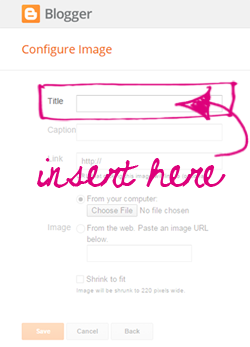
I know many of us have struggled for a long time with the "Image" gadget. Gone were the days when we could leave the "Title" area blank.  It had been nice when using sidebar tags because, well let's face it, using a title above a title is a bit redundant. ;~)

Recently while wandering through blogland I happened upon a fix (yay!).  It seems that whenever you type in a small snippet of code, it tricks the gadget into thinking there's a title so when published, nothing shows up. This enables all of us using tags to once again use them as section titles, whoot!

Here is the code:
<!--->

Just type or copy it into the "Title" area of the Image gadget, insert your image and then click save ~ you'll be all set!


To celebrate I'm offering this free set of sidebar tags! Just click the button below to download and save the set to your computer. They can be used as section titles or even linked images if you prefer.   I've included a lot of extra titles too (more than my regular sets) so you've got a lot more options for uses. Just remember to add that snippet of code above and you'll be all set!


Enjoy~

Monday

Gone Missing? Here's the Fix~~

It seems the internet gremlins have been up to no-good and many of my lovely Plumrose Lane images have gone missing, humph!!  If you find they're missing from your blog and you installed the images yourself then use the steps below to easily fix them.

If I installed the theme for you, then click my signature at the bottom of this message to send me an email and we'll get things back up for you~ ♥

To fix the missing images you will be replacing a single word in some code on your blog. Here's a quick key of where to find the different codes for each image type.

Background
Click on the "Layout" section of your blog then locate the "Html/Java Script" gadget for your background.

Post Divider
Click on the "Template" section of your blog, then click on "Customize". Click on "Advanced", then scroll down to "Add CSS". The code should appear under the "Add custom CSS" area.

Blog Signature
Click on the "Settings" page of your blog. Click "Posts and comments", code will be found in the "Post Template" area, 2nd choice from the top.

Button, Badge, or Tag
Click on the "Layout" section of your blog then locate the "Html/Java Script" gadget for missing button, badge, or tag.

The Fix
Once you find the code to fix the missing image you will simply need to replace the word: "prl-images" with "plumroselane". This word may appear several times within one snippet of code so I recommend using the "Find" feature in your browser to make sure you replaced them all.

Here are quick search links to help you find this tool for the most commonly used browsers:
Chrome
Internet Explorer
Fire Fox
Safari
Opera

Once all of the words have been replaced then click "Ok" or "Save". The missing image should now be back.

Please feel free to contact me if you  need any additional help ~ just click my signature below to open an email message.



Sunday

Customer Shout Outs

Gee it feels like forever since I last wrote a customer shout-out. It's not that I haven't been swamped with work it just seems that so much of it has been related more to Helping Hands projects and helping customers set up their blogs.  The custom projects I've been working on have also taken longer lately as my creative envelope gets stretched further with each new theme.  Still, writing these shout-outs is always such fun because not only do I get to share some of my creative work but I get to introduce you to a great group of customers. So here's a smattering of some recent work and customers...

This theme took nearly a year ~ yes, it's tough to believe but some projects do take that long. We bounced a  lot of ideas back and forth and finally wound up with the perfect combination for this blog about quilting and other crafty projects.

This project was filled with fantastical imagery as we dove into the world of the macabre and supernatural.  The ogre was loads of fun to create as well as the other intricate details (note the swimming koi under spyglass) in this truly unique theme.
On a personal note, I feel bad as the customer took ill shortly after finishing the theme and hasn't had a chance to enjoy her blog yet.  I do hope she recovers quickly and am asking that you all send her some healing energy.

 This return customer was in need of an appointment card to coordinate with the business card I created for her a few months back so we wound up with this energizing set, just perfect for her Reiki sessions.

Glitter Tart Designs
This custom project involved creating two original images, the first was this social links bar with a vintage flair.  I chose to create what looks like a lovely piece of vintage jewelry to host her social networking links.
Glitter Tart Designs
 The second piece was her custom blog badge which includes the customer's own artwork incorporated into some other images.


Green Witch with Sprinkles
I don't usually do shout outs for smaller image projects but this one was especially fun since we included one of her actual products in this custom post divider. It's always a challenge working with actual product images but the results can be so fantastic!


Oracle Reading by Kawehi
Language barriers can often prove a bit complicated and while several of my recent customers have not spoken English I thought I'd give a special shout out to this extended theme project.
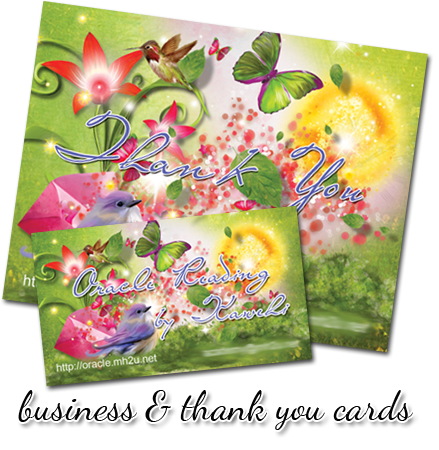
 Kawehi began with one of my prefab themes and then selected to have me created a custom blog badge and coordinating business images including a business card and thank you card.  
She provide the text for her custom badge so her local visitors could understand and share.

So that's a sampling of some of the recent projects I've worked on ~ I do hope you'll take the time to click through some of the titles and images to discover some wonderful indie businesses and even make some new friends.  Meeting other bloggers and online indie venues is simply the best part of this online world we all share!

Enjoy~

Saturday

Important - New Updated Background Codes

Well I'm doing a serious happy dance as I've just finished updating all of the backgrounds in the "Just Backgrounds" area.  This project is SO huge but getting one part of it done brings that end just a little bit closer, whoot!

So, if you've been following along with my"Bucket" series and you're using one of my "just backgrounds" then you know it's time to change out the old code on your blog before the image disappears.  Simply click this title, Just Backgrounds, to find the complete list of titles and replace your old code with the new one.

If you're using a Plumrose Lane theme and don't see the title listed above then check my previous postings below and check back for upcoming announcements. If you're not sure what this is in reference to then you can read over a few of my recent posts below this one and check out the original posting, "The Bucket". All codes will be switched over in the event they are deleted by Photobucket. 

Best,

Friday

Revamp Update - Post Dividers

In follow up to my posting, The Bucket, I've begun building my new website. Saying it's a monumentally overwhelming task is definitely an understatement but the good news is I'm making progress.  I have the first few pages up and the one which matters most at this is the list of prefab Post Dividers.  Here is the new direct link to that page where you can find updated image codes: http://www.prl-images.com/post_dividers.html  If you're using one of my prefab post dividers now is the time to switch out for the new link before the old ones disappear.

I will continue to post updates as they happen ~ both here and on my Facebook page (http://www.facebook.com/plumroselane), although the FB posting happen a little sooner since they're quicker to post.

Best,

Thursday

The Bucket

Gee I wish that title had something to do with an exciting "list" but sadly it doesn't.  No instead it's related to a certain online storage site that's quickly climbed to the top of my loathing list. It's not a very big list and it takes an awful lot to get there.

For the past 3 years I, along with many other theme designers, have been using Photobucket for our online storage. Paying for a Pro account was affordable and most importantly they offered the ability to store large size images for easy online use.  Much to my surprize and apparently a sea of others, Photobucket is discontinuing this feature. Whether permanently or not, it's a tough blow to many, and for some of us it's down right disastrous.  As I explained it to one colleague  it's like watching a tidal wave approach but not knowing exactly when it will hit.

Not being the sort to curl up in a ball and cry (that was yesterday) I've now taken on the immense task of creating a new website. It's something I had planned on doing but certainly not under these circumstances.  So if by some horrible chance you suddenly see your Plumrose Lane background disappear please know that I'm working around the clock to try and remedy the situation as quickly as possible. I will keep you posted as updates happen and remember you can always follow along on my Facebook page at: www.facebook.com/plumroselane  I'm going to try adding more frequent updates there as well.  So here's to drier seas ahead for all of us in the very near future.

Best,

Friday

Seasonal Themes & a Tutorial

I was hoping to be further along with updating my blog themes but it seems to be a never ending task at this stage. I'm sure that's not really the case and instead is like anything else in life ~ a lot of baby-steps until we finally arrive at our goal.  Happily I was able to update all of my Valentine's Day themes so those are ready for use.

While updating some of my older themes I'm finding that the newer creative skills I've gained through the years are kicking in and I'm not only updating the sizes but giving some of them a whole new look and feel too. Case in point is the Je T'aime theme ~ once featuring a nice weathered harlequin background and a few red daisies with not much else going on, it now boasts an eclectic mix of rusty vintage elements with hints of Shabby Chic.  It's fun to "upgrade" my own designs and even more fun to see if you'll like them as well.

You can view all of my Valentine's Day themes by clicking the images and titles below or access them through the Seasonal Themes link on my sidebar:


Since several of these themes offer free banners I thought it was about time I put together a tutorial for adding a blog title to a banner image.  I know this is something that's been challenging for some of you so now you can follow along with this newest tutorial ~ How to Add Text to a Blog Header.

I'm sure this month will go by super fast, they all seem to anymore, so here's hoping it's filled with loads of creativity and inspiration for all of you!

Enjoy~

Saturday

Holiday Gifts - the cookie project

I've been busying myself with crafting an assortment of holiday gifts this year. It's been an especially tight one for my wallet which might mean cutting back on quantity but fortunately not quality.  This year a selection of family and friends will be receiving white boxes filled with homemade cookies.

I mentioned my cookie project a few weeks back and have since added this wonderful holiday magazine, A Taste of Home Best Loved Cookies & Candies, to my recipe repertoire.  It's been a super resource as I've worked my way through their extensive collection of tasty treats. My personal favs are the Chocolate-Tipped Butter Cookies (shown below), if you close your eyes they taste just like Milano cookies, minus the nuts, yummm!


The boxes I mentioned are now jam-packed with tasty treats and soon to be on their way.  I chose to do several layers of different cookies within each box and placed wax paper between the layers, adding in a few miniature Vanilla Butter Cookies with green and red icing for a colorful surprise.  I lined the boxes with a vinage-y printed tissue paper and finished them off with this printed announcement on the top.


Here is the actual announcement image which you're welcome to click on and save to use in your own holiday treat packs.


I have to admit I almost felt like Martha Stewart which made me laugh but in truth I'm so happy with how everything turned out.  It's amazing how a little extra work can enable us to make such a lovely and personal gift.  I think that's the best part about handmade ~ there's so much added "soul" put into everything we create. That's the fun part about sharing with other crafter/artists too, we understand what's behind the creation and appreciate it even more.

Best,

Monday

From Blogger to Facebook ~ new banners

Just when you thought Facebook couldn't get any more complicated they go and change things up... again! Yes, for those of you using Facebook, either to socialize or promote your handmade business, you may have noticed they've recently gone over to a new format.

First they offered us the choice of 'trying out' the new layout on our personal pages and then that hard-to-miss message showed up on business pages letting us know the 'official' change over would take affect March 31st.

Being a graphic artist I personally enjoy that large blank space at the top of my Facebook page because to me it's like a blank canvas waiting to be filled but for others it's a little more difficult trying to figure out how to fill that space. So for those of you struggling I've got just the answer ~ now you can use one of my prefab banners for the top of your Facebook page and even personalize it with a favorite quote or verse!

Just choose a theme title from my A-Z list, then grab this listing from my shop and include the title along with a favorite quote, saying, or verse. I'll get your new Facebook banner right out to you with instructions included ~ what could be easier!?!

Oh and if you're using one of my custom order blog themes, no problem, they're included in this listing as well!

If you're looking for something a bit different ~ say a totally original look and want a one-of-a-kind custom banner or Welcome page for your business, I've got that covered too ~ just checkout the new Facebook Images section in my shop!

See you in the social arena...

Enjoy~

post signature