Showing posts with label photo. Show all posts

Tuesday

Image Title Issue ~ Fix & Freebie

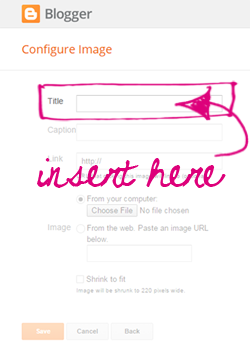
I know many of us have struggled for a long time with the "Image" gadget. Gone were the days when we could leave the "Title" area blank.  It had been nice when using sidebar tags because, well let's face it, using a title above a title is a bit redundant. ;~)

Recently while wandering through blogland I happened upon a fix (yay!).  It seems that whenever you type in a small snippet of code, it tricks the gadget into thinking there's a title so when published, nothing shows up. This enables all of us using tags to once again use them as section titles, whoot!

Here is the code:
<!--->

Just type or copy it into the "Title" area of the Image gadget, insert your image and then click save ~ you'll be all set!

To celebrate I'm offering this free set of sidebar tags! Just click the button below to download and save the set to your computer. They can be used as section titles or even linked images if you prefer.   I've included a lot of extra titles too (more than my regular sets) so you've got a lot more options for uses. Just remember to add that snippet of code above and you'll be all set!


Enjoy~

Saturday

Plum Infusion

Took a little time to create a new Treasury this morning ~ haven't created one of these in forever. Hope you enjoy...


Artist's Spotlight ~ Shelby Scott Photography

It's always a treat to share the creative talents of other artists but none more so than when there's a personal connection.  In this case it happens to be the inspiring talent of Shelby Scott Photography.


The personal connection is through our middle son, shown below in the bottom right. Artists always seem to converge and such was the case as they became good friends in high school, several years ago.  Shelby, shown below with painted face and further down with seaward hair (love that), has since moved on to college where she's just graduated with her degree from the Antonelli Institute.


Watching our kids grow through childhood is filled with so many special moments but watching them emerge into adulthood and begin to pave their own way in this world fills us with pride, wonder, and excitement.  We can only begin to imagine the roads they'll travel and how they'll impact this world through their own talents.


One thing is for certain, we've absolutely no doubt that where ever this gifted artist goes, success is sure to be her constant companion as she journeys through life!

You can view more of her work at: www.facebook.com/ShelbyScottPhotography  and www.shelbyscottphoto.com/

Enjoy~

Wednesday

Blogger Photo Issues (!)

Recently a customer contacted me to help out with an issue she was having with her Blogger profile picture. Instead of seeing her image show up whenever she left comments on posts she would see this awful black exclamation point instead. I was able to figure out a fix for her and so I'm sharing it here with you ~

Remember, you can enlarge any image below by clicking on it.

I began by visiting her profile page ~ you can get to your own profile page by logging into your blog and going to your "Dashboard"...

Once there click on the "Edit Profile" link...

This takes you to the page where you control what people see when they visit your "About Me" page...

It's a log page so I've only shown a portion of it above.

What I found was that by simply reinstalling the customer's profile photo she no longer experienced the photo error so regardless of whether your photo is showing up or not, we're going to reinstall it from your own computer. So be sure you have a copy of your photo on hand before you continue on to the next step.

Now, scrolling down to the "Photograph" area, if you have an image there click on the "Remove image" link...

Now click the "Browse" button to locate your photo on your computer...


Scrolling down to your own profile photo, click on the image and then click the "Open" button...


Your photo will now appear in the box...


To save your changes, scroll down to the bottom of the page and click the "Save Profile" button...
That's it!

I know Blogger has been undergoing loads of changes lately including how they handle post images so my guess is this issue has something to do with those changes. Whatever the case I hope this fix was helpful to all of you as well.

Enjoy~

post signature